SLEAP System Overview
SLEAP is built as three interconnected packages that work together to provide a complete pose estimation workflow.
Package Architecture
┌─────────────────────────────────────────────────────────────────┐
│                           sleap                                  │
│         GUI, CLI entry points, quality control, glue            │
├─────────────────────────────────────────────────────────────────┤
│                              │                                   │
│              ┌───────────────┴───────────────┐                  │
│              ▼                               ▼                   │
│     ┌─────────────────┐            ┌─────────────────┐          │
│     │    sleap-io     │            │    sleap-nn     │          │
│     │                 │            │                 │          │
│     │  Data model     │            │  PyTorch models │          │
│     │  File I/O       │◄──────────►│  Training       │          │
│     │  Format convert │            │  Inference      │          │
│     │  Video backends │            │  Tracking       │          │
│     └─────────────────┘            └─────────────────┘          │
└─────────────────────────────────────────────────────────────────┘
sleap
The main package providing:
- Labeling GUI (
sleap label) — Annotate keypoints, manage projects, review predictions - Unified CLI (
sleap) — Single entry point for all commands - Quality Control — Detect annotation errors
- Integration layer — Connects sleap-io and sleap-nn
sleap-io
Data handling and I/O operations:
- Data model — Labels, Videos, Skeletons, Instances, Tracks
- File formats — Native
.slp, plus import/export for COCO, NWB, DeepLabCut, and more - Video backends — Read frames from MP4, AVI, HDF5, image sequences
- Utilities — Merging, rendering, transformations
Documentation: io.sleap.ai
sleap-nn
Neural network backend (PyTorch):
- Model architectures — Top-down, bottom-up, single-instance, centered-instance
- Backbone networks — UNet, ConvNeXt, SwinT, and pretrained options
- Training — Data augmentation, loss functions, optimization, logging (WandB, TensorBoard)
- Inference — Pose prediction, peak finding, multi-instance grouping
- Tracking — Identity tracking across frames
Documentation: nn.sleap.ai
Workflow Stages
1. Data Preparation
| Step | Tool | Description |
|---|---|---|
| Import videos | GUI or sleap-io |
Load MP4, AVI, HDF5, or image sequences |
| Create skeleton | GUI | Define nodes and edges for your animal |
| Label frames | GUI | Annotate keypoints on training frames |
| Import existing labels | GUI or sleap-io |
Convert from COCO, DLC, LEAP formats |
2. Training
| Step | Tool | Description |
|---|---|---|
| Configure model | GUI or config file | Choose model type, backbone, hyperparameters |
| Train | GUI or sleap train |
Train on labeled data with augmentation |
| Monitor | TensorBoard or WandB | Track loss, metrics, visualizations |
| Evaluate | GUI | Check precision, recall on validation data |
3. Inference
| Step | Tool | Description |
|---|---|---|
| Run inference | GUI or sleap predict |
Predict poses on new videos |
| Track identities | Automatic | Link instances across frames |
| Proofread | GUI | Fix tracking errors |
| Export | GUI or sleap convert |
Save to HDF5, CSV, NWB, COCO, etc. |
CLI Commands
The unified sleap CLI provides access to all functionality:
sleap label [FILE]      # Launch GUI
sleap doctor            # Check installation
sleap train ...         # Train models (sleap-nn)
sleap predict ...       # Run inference (sleap-nn)
sleap convert ...       # Convert formats (sleap-io)
sleap show ...          # Inspect files (sleap-io)
See Command Line Interfaces for full documentation.
Legacy Architecture
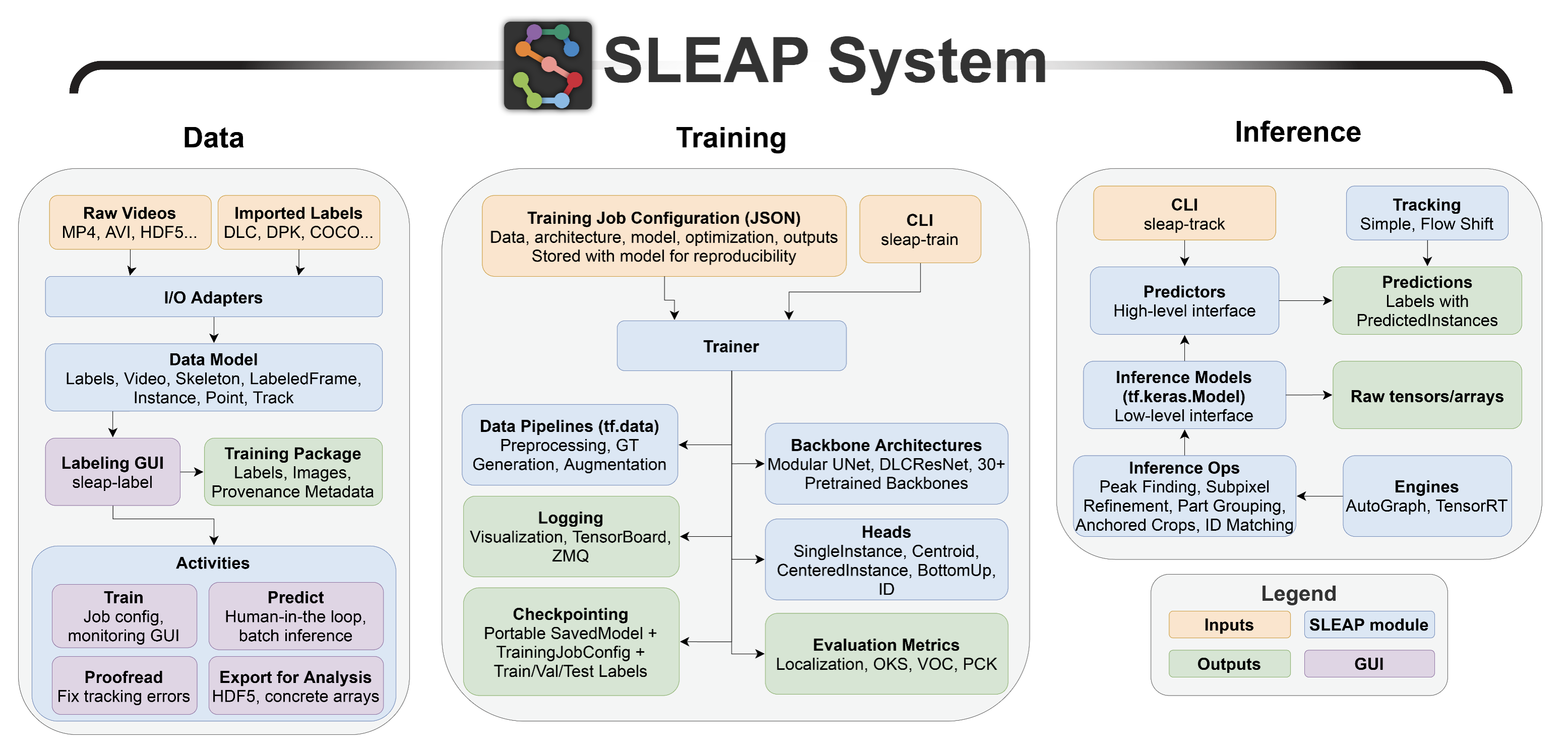
Historical context
Earlier versions of SLEAP (pre-1.5) used TensorFlow for training and inference. The diagram below shows this legacy architecture for reference. Current versions use sleap-nn (PyTorch-based) for all neural network operations.